User Interface · Mobile App Design
My Role: UI Design, UX Design, Interaction Logic Structuring
Team Members: UI Designer – Xingxiu He, Front-end developer – Qian Gong & Qijian Wan
May 2025 – July 2025
Project Overview
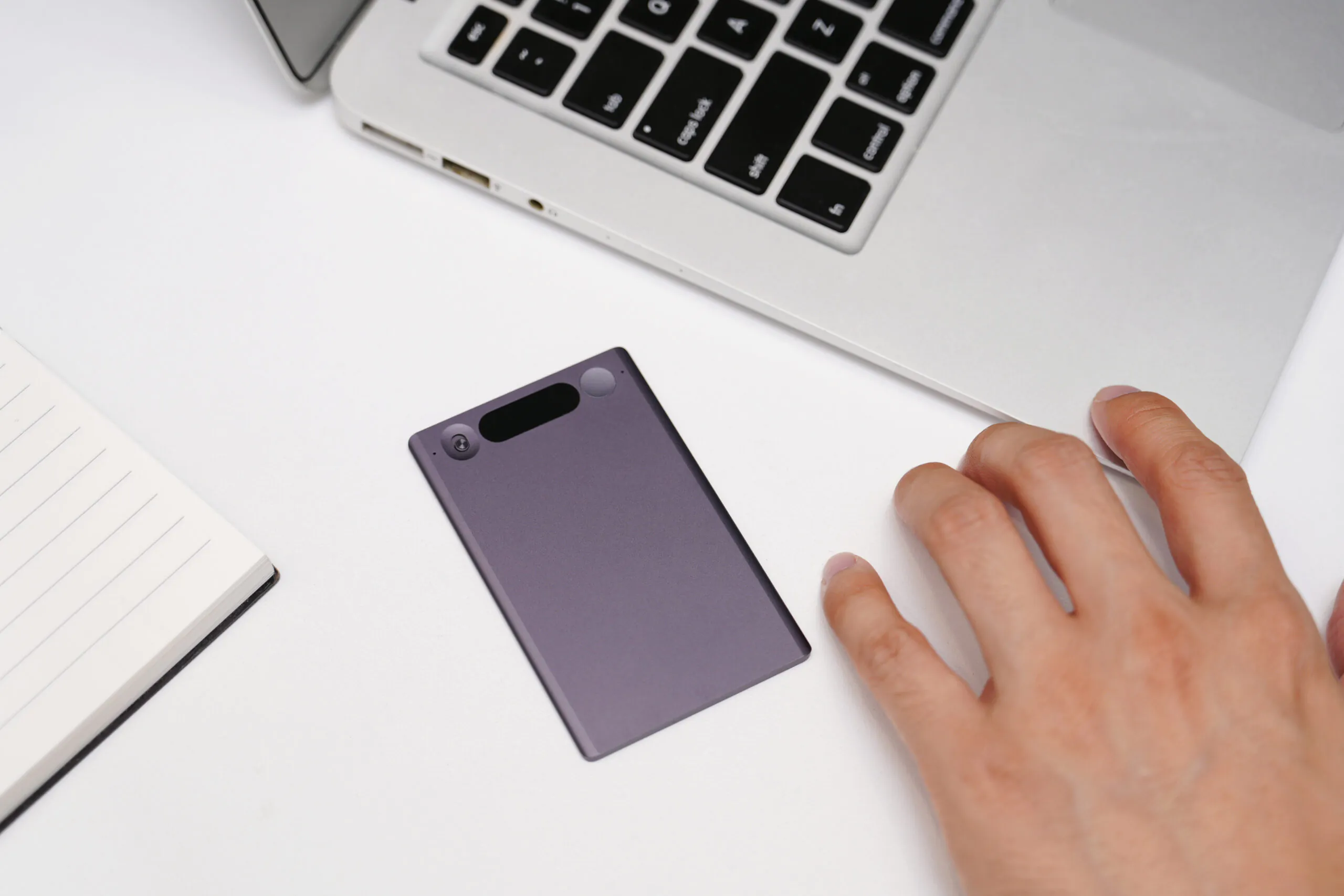
Dting.AI is a voice recorder app that combines portable hardware with an intelligent voice recognition system. It aims to improve the efficiency of capturing, managing, and reviewing voice content. Through a simple and clear interface, the product helps users quickly complete a voice workflow, including recording, categorization, searching, and exporting. Link to Dting AI in App Store
My Contributions & Responsibilities
I was responsible for the overall user experience design of the Dting AI recording pen, focusing on the seamless integration between hardware interaction and software interfaces. I led the high-fidelity UI design for the voice recorder app, translating complex recording, transcription, and playback workflows into clear and intuitive user flows. Throughout the process, I conducted multiple rounds of user testing and design iteration, and closely collaborated with the development team to clarify interaction logic and ensure accurate implementation of the design intent.
Problems Space & Corresponding Soltion
Through interviews with potential users, we identified the main pain points and behavioral patterns of users when recording, reviewing, and sharing audio content.
Employee A: “I have many meetings in a day, so I make a lot of recordings, which are very painful and time-consuming to listen back to.”
- Users accumulate large numbers of recordings, but without structure, it becomes inefficient to locate key information.
- Design response: AI transcription and tagging allow users to search recordings through text and jump directly to relevant segments, reducing the time spent sorting and replaying audio.
Employee B: “After recording, I can only share it with colleagues through other platforms in a disjointed manner. I often forget to share it after the meeting, which reduces efficiency.”
- In team scenarios, one person records, but multiple people need access to the content.
- Design response: The system supports built-in sharing and collaboration. Team members can access uploaded recordings and transcripts, and add tags or edits within the team workspace.
Employee C: “If I suddenly want to record something during a call, it is too troublesome and time-consuming to find and open the recording software.”
- Users hope to start recording in the quickest way and in the shortest time because of many temporary situations.
- Design response: The hardware is designed for one-button recording, with automatic syncing to the app, allowing users to capture content instantly without navigating software.
Student A: “Not only does it take a long time to take notes after recording the class, but it also becomes very complicated to listen back to the recording or review the notes, which gives me a headache.”
- The notes users take by listening back are not intuitive and obvious enough
- Design response: In addition to transcription, the system can generate translations, summaries, and mind maps, making key points more intuitive and easier to review and share.
Product Competitive Analysis
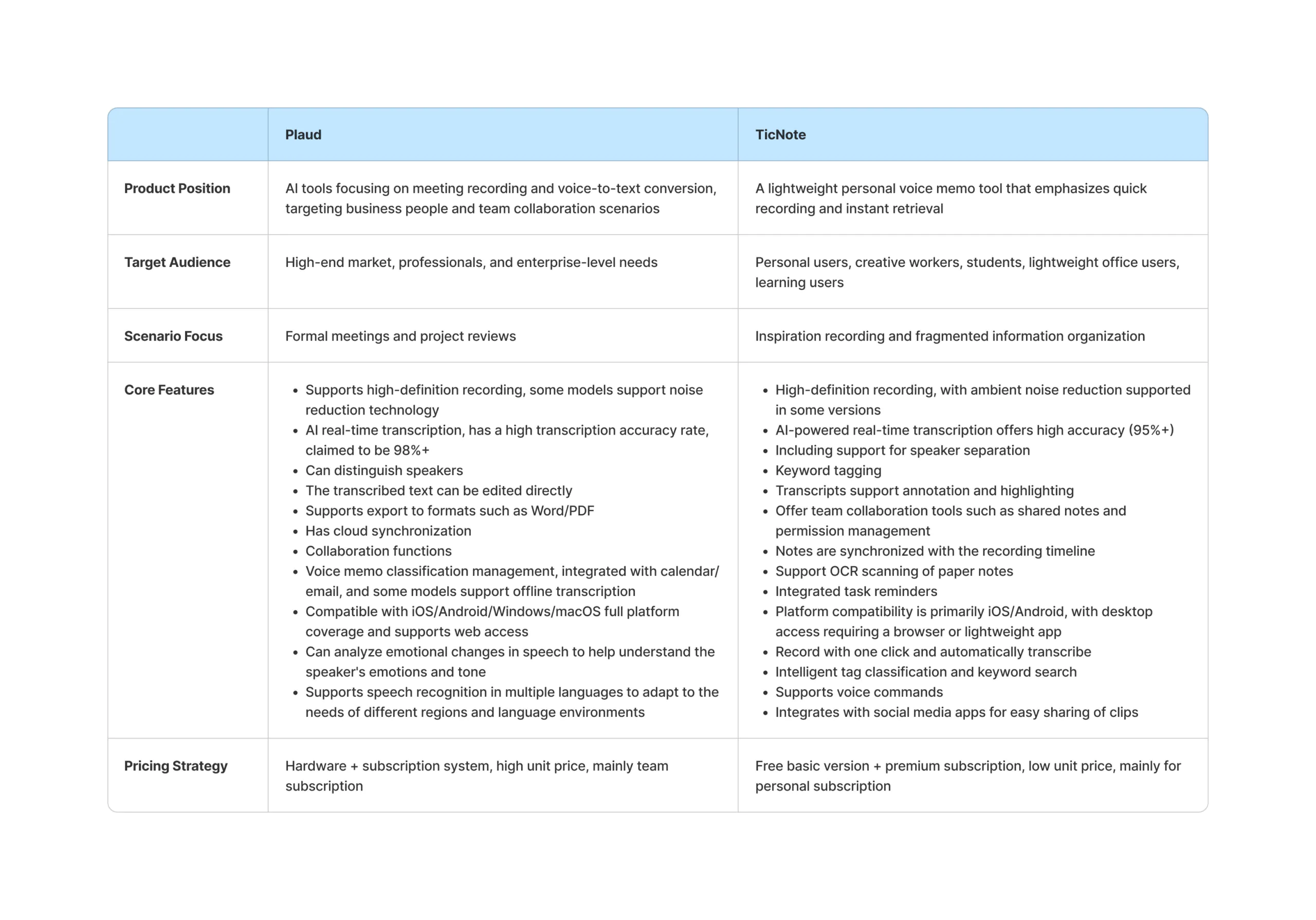
Both Plaud and TicNote respond to the growing demand for fast, structured information capture across work, education, and content creation scenarios.
Plaud positions itself toward professionals and high-end users, focusing on advanced AI transcription, higher accuracy, and intelligent features that help users save time and manage large volumes of recorded content more efficiently.
TicNote, in contrast, emphasizes simplicity and accessibility. It relies on cloud-based voice recognition and lightweight workflows, making it suitable for everyday recording, quick note-taking, and small team collaboration.
Their success comes from clearly defined user segments and product strategies aligned with different levels of complexity and usage needs.
Functional Organization Mind Map
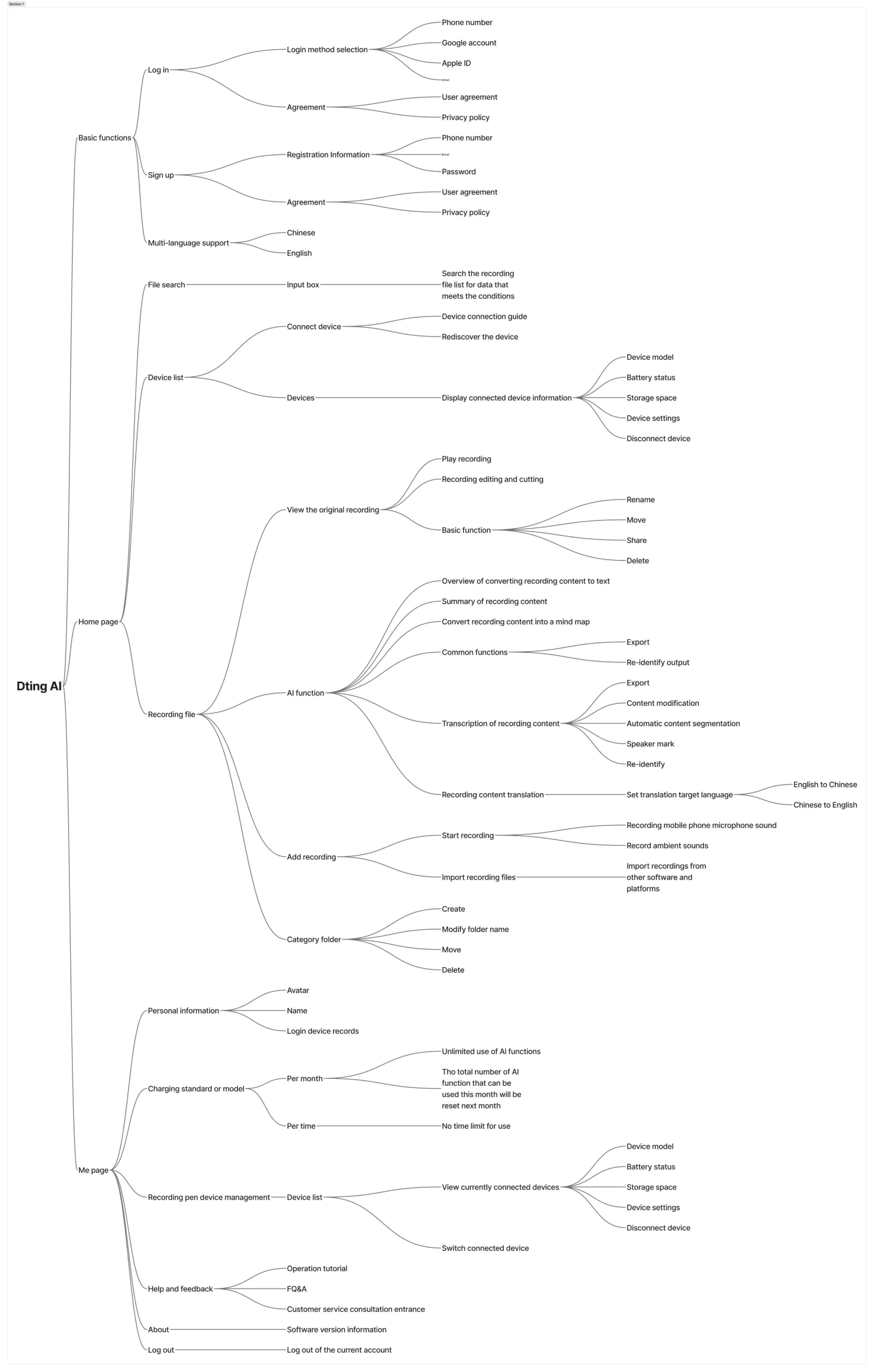
Before starting the Dting AI project, I created a functionality mind map to clarify the overall framework of both the recorder and its companion app. This process helped me identify key touchpoints in the user journey, as a result, my later design iterations were more focused and user-centered, ensuring that the interface architecture and interaction flows stayed consistent with core user needs.
Key Features Breakdown
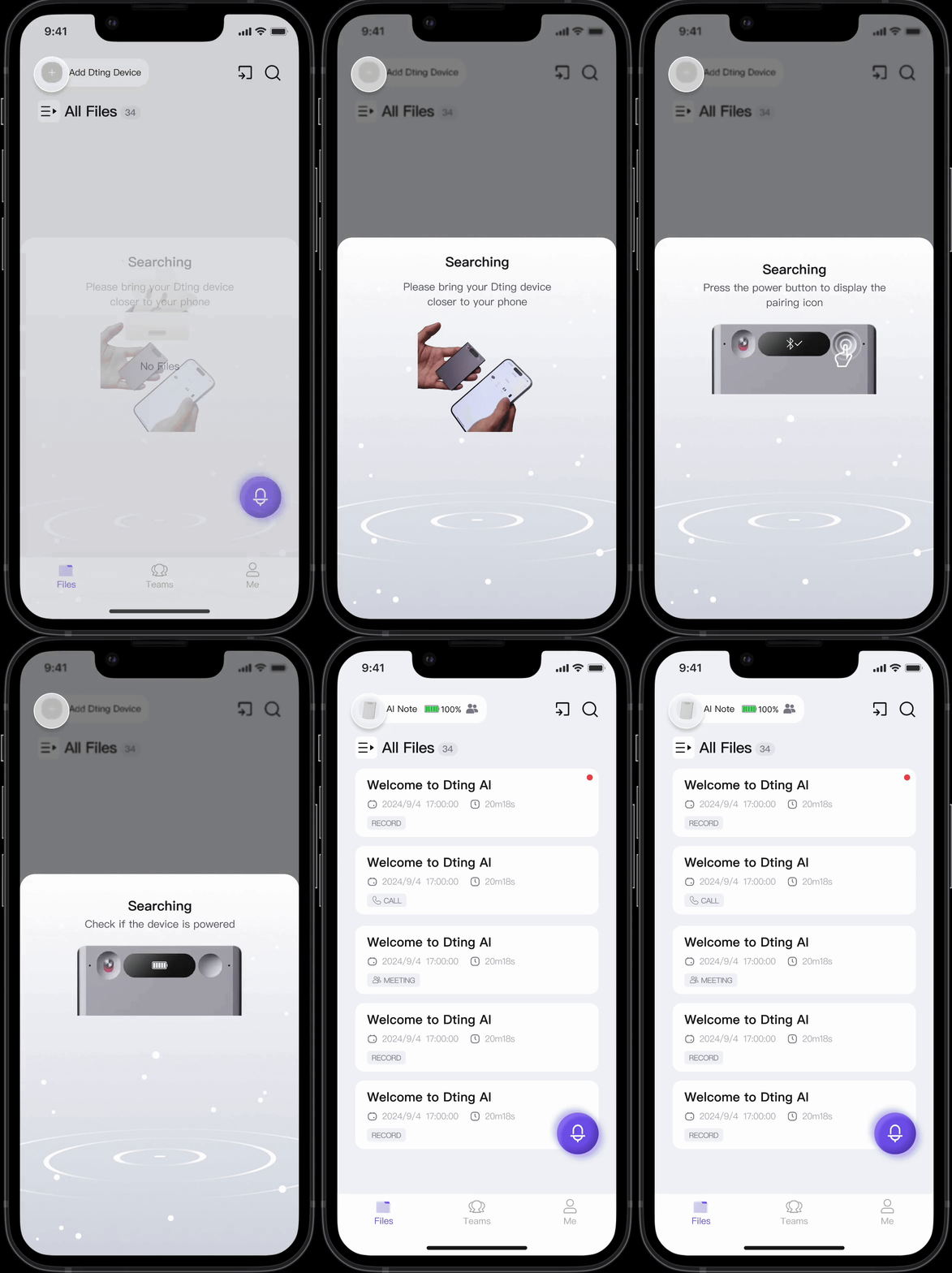
The hardware finds and connects to the phone when nearby, making setup seamless and effortless.
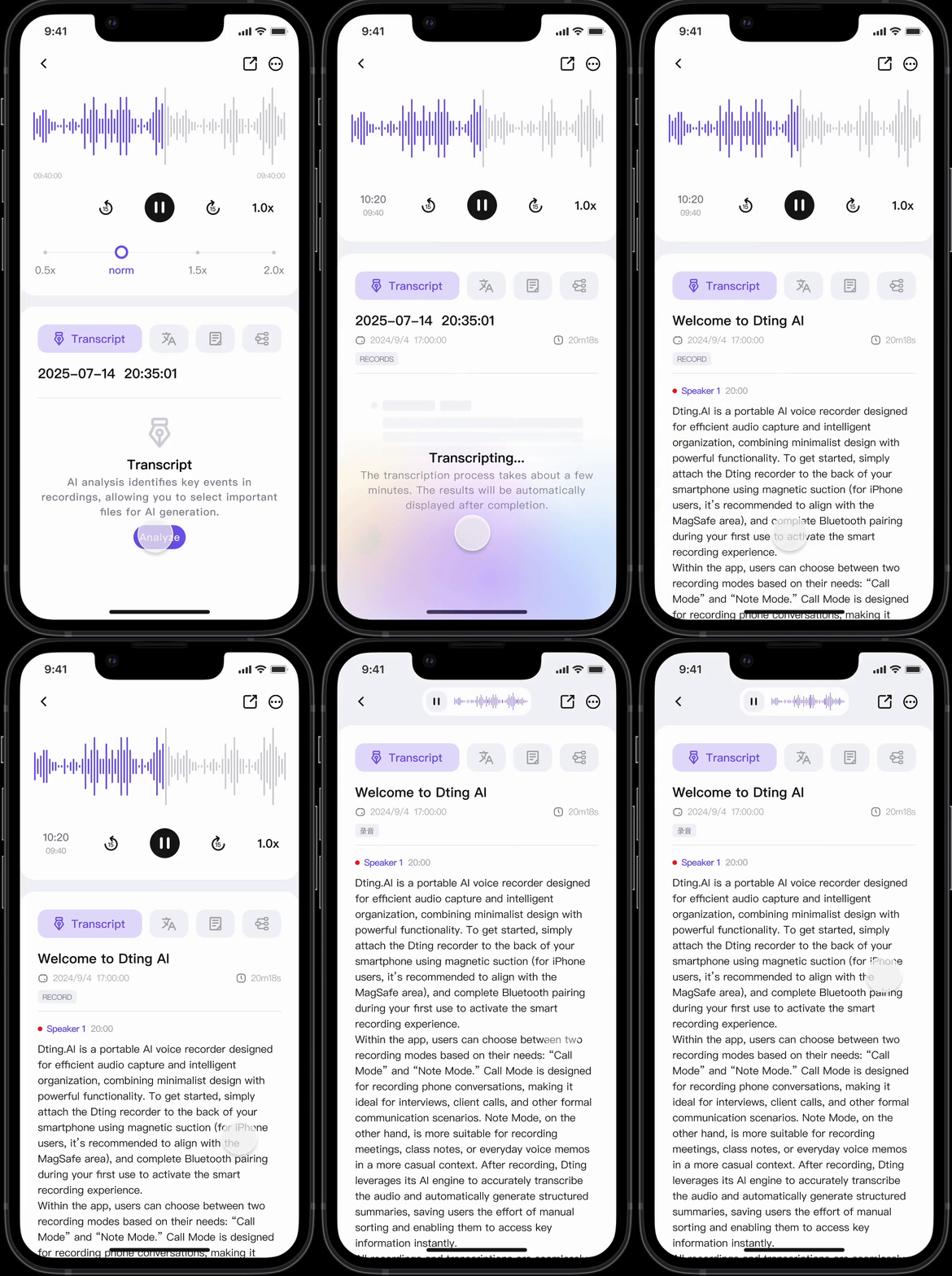
Use built-in AI to transcribe recordings directly in the document and the text is editable afterward.
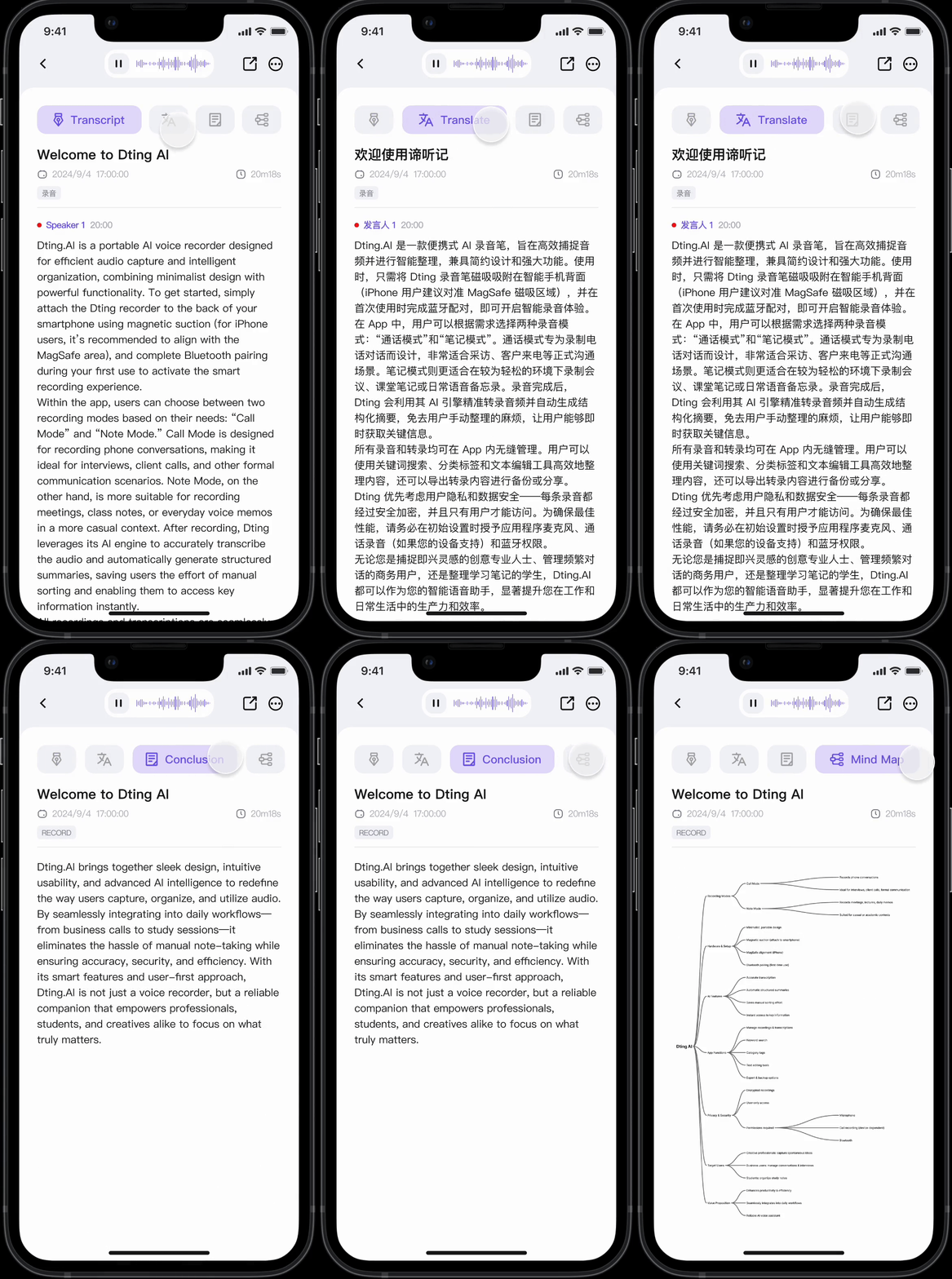
Beyond transcription, built-in AI can translate, summarize, and generate mind maps from recordings.
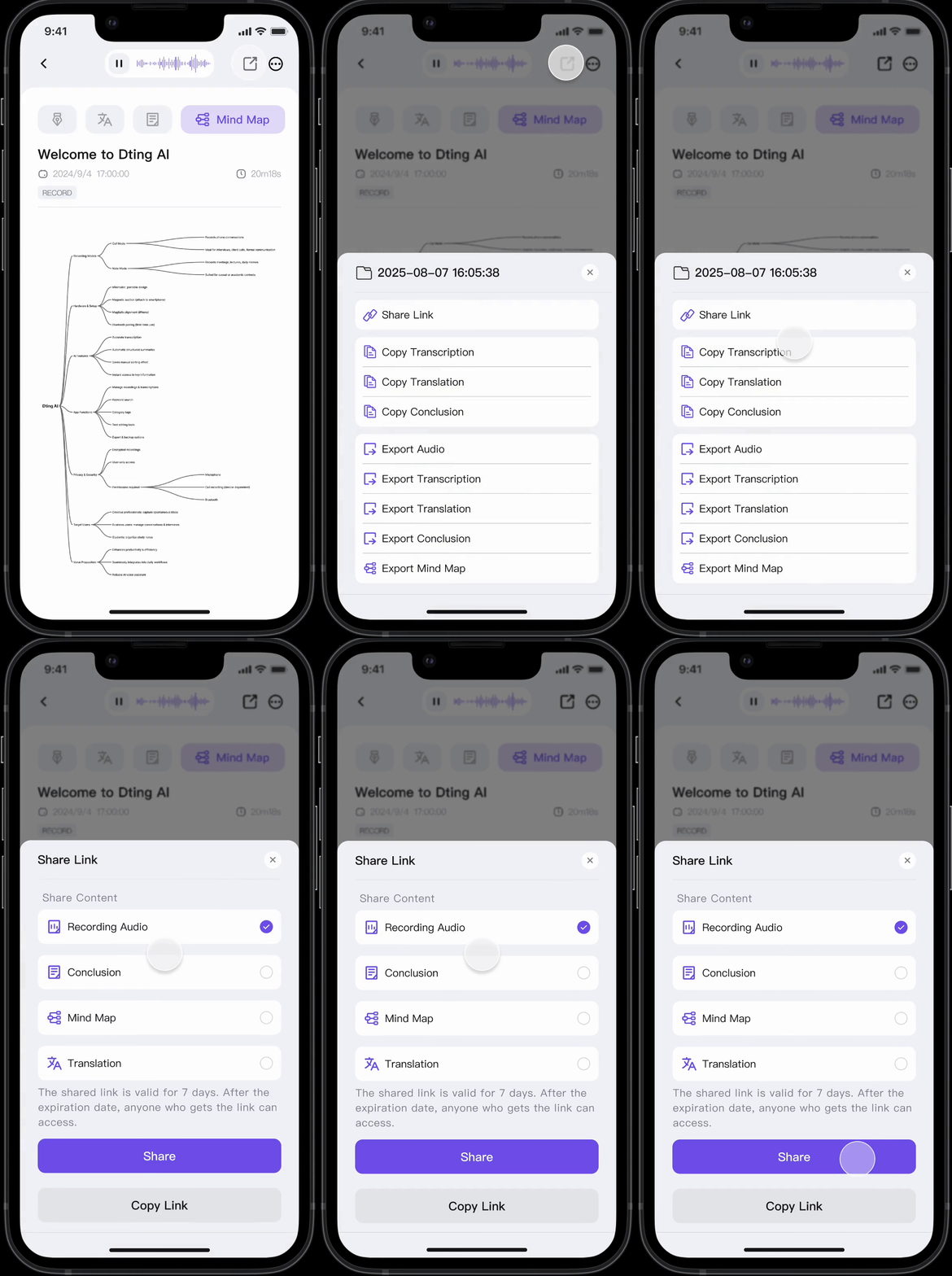
Export all generated content in multiple formats for easy sharing and collaboration.
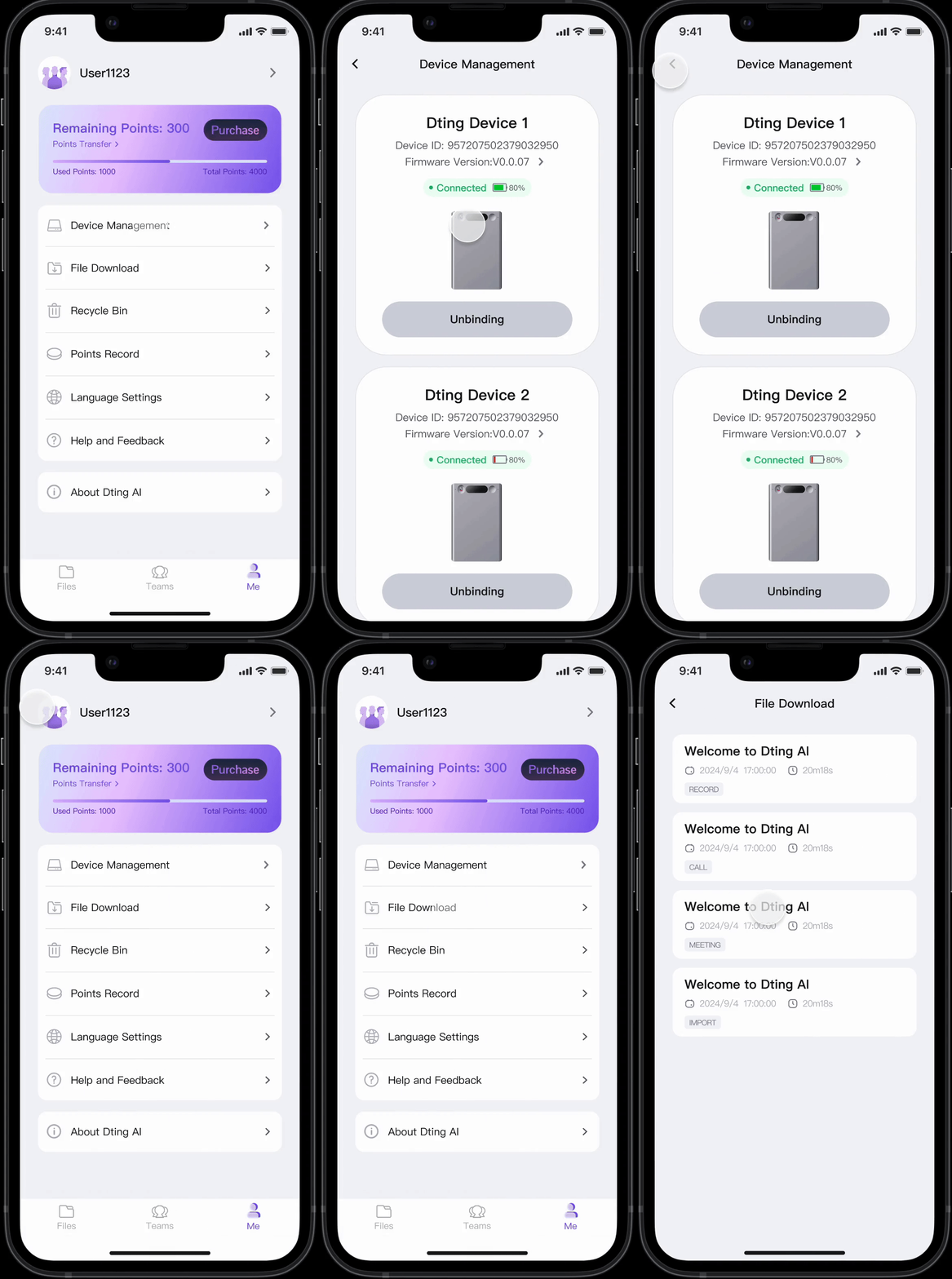
The personal page brings together device management, file downloads, recycle bin, point records, language settings, help and feedback, and app information in one place.
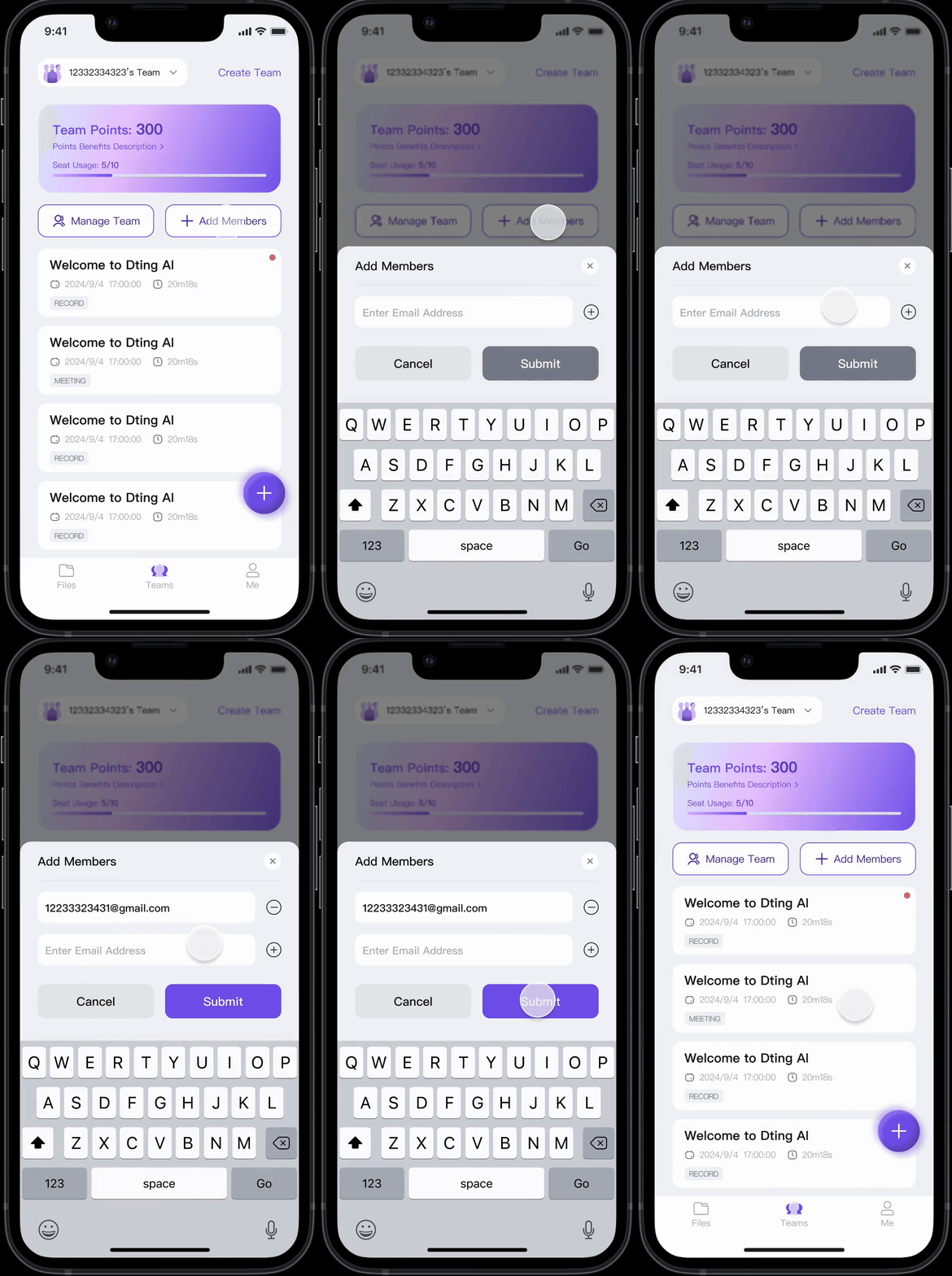
From the team page, simply enter an email address to invite new members to join.
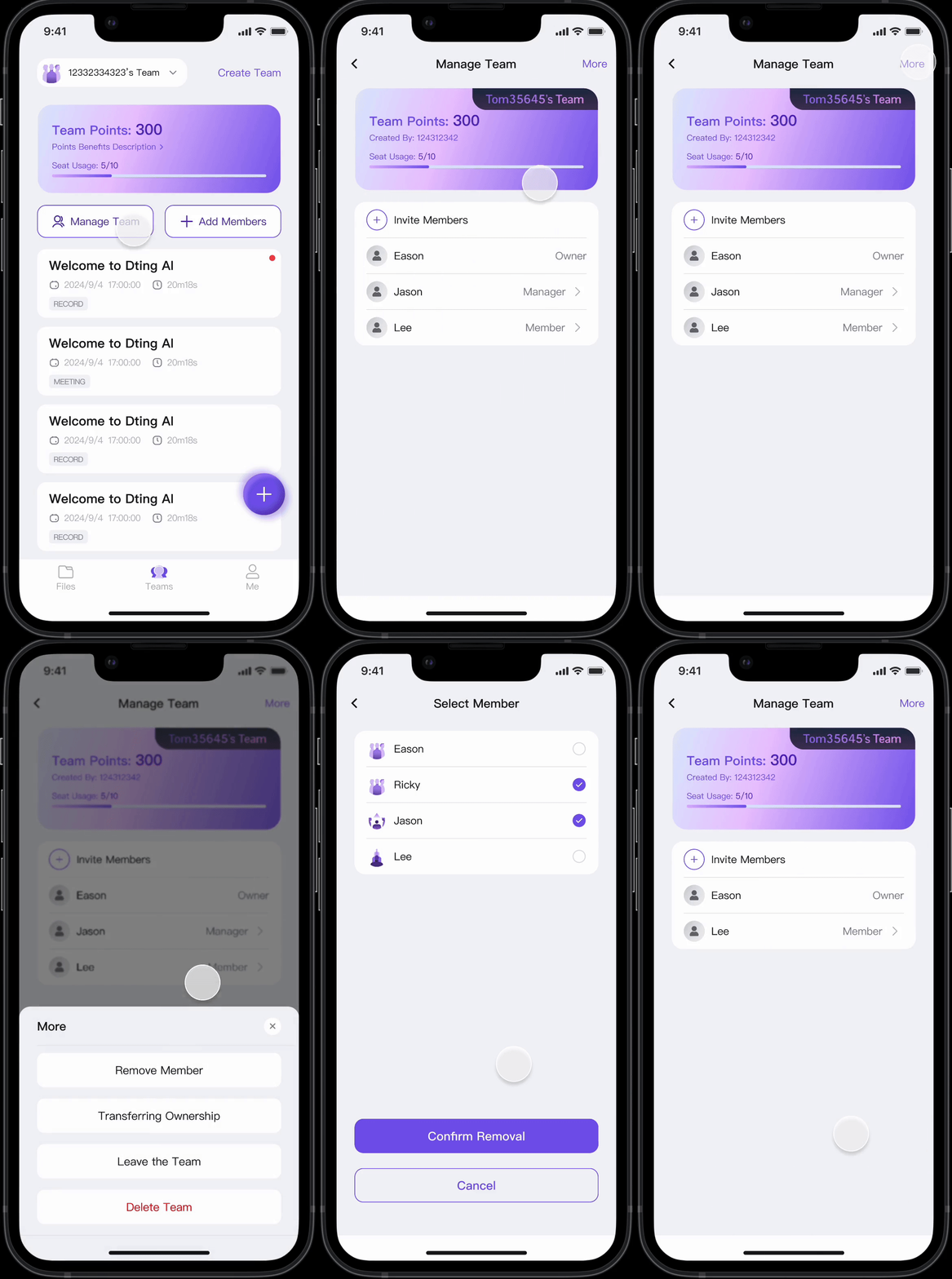
Owners and managers can edit and manage members from the team page.
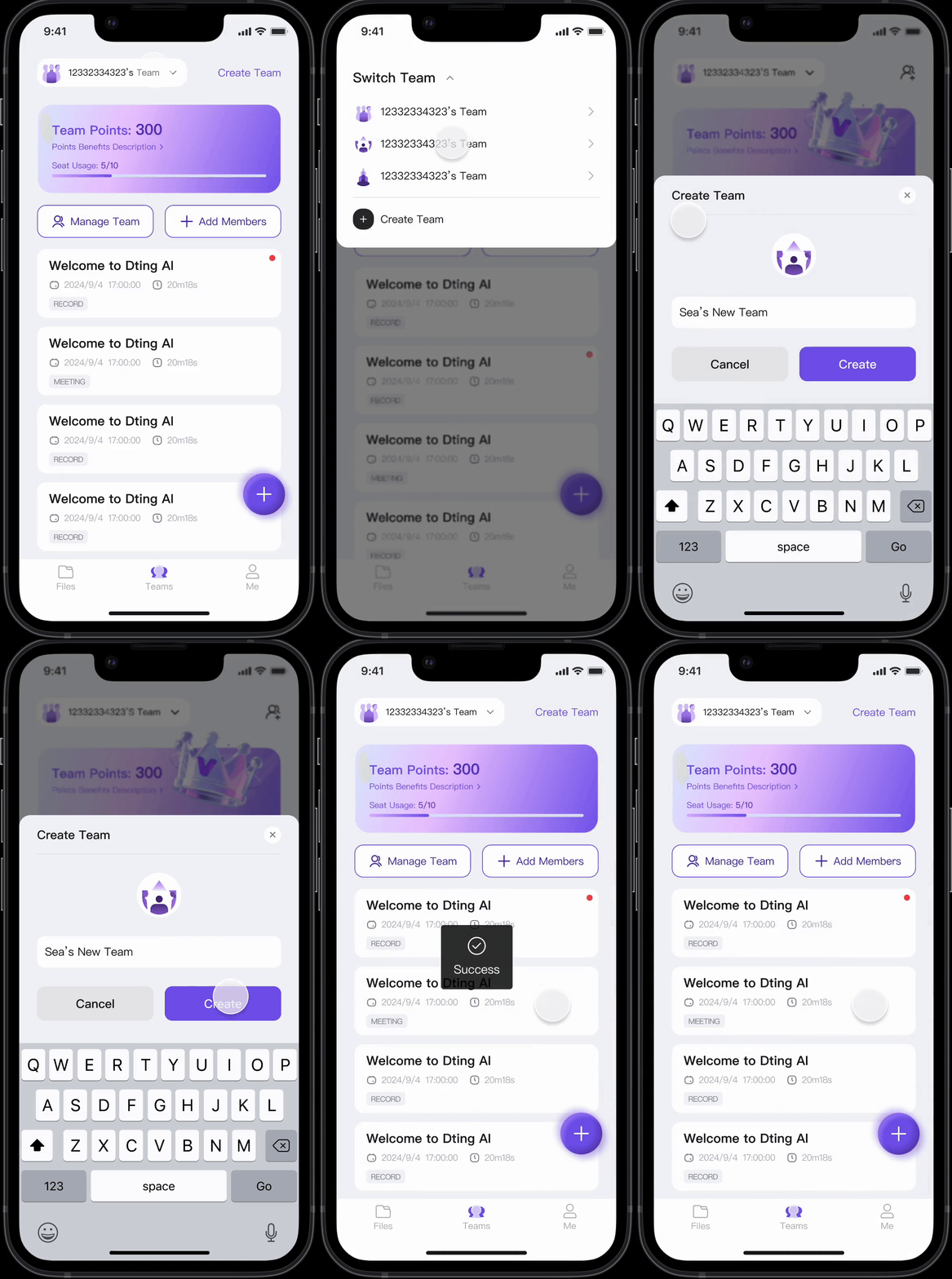
Users can join multiple teams and switch between them from the top-left of the Team page, where they can also create a new team.
Prototype Iteration – V.1
- Software and hardware coordination: You can start using the hardware device after connecting it in the app
- Personal recording workspace: Users can record and edit classified files
- Transcription functions: Recordings can be automatically converted into text through AI, and conclusions, outlines, and mind maps can be generated for users to freely export and share
- Duration system: The platform adopts the strategy of paying for transcription time and using the function
Optimizations Discovered
- Combine the recording and import buttons into a pop-up, and position the Add Recording button at the bottom for a more appropriate placement.
- The unread message indicator is too obtrusive, it should be moved to the top right corner, where it should be placed alongside regular unread messages.
- Shrink the file category bar.
- Move the device list to the top left, so it expands when clicked, to avoid taking up too much space on the main page.
- The speed playback icon looks more like an adjustment than a clear one, and the pop-up box isn’t very prominent.
- Add a navigation bar and move the profile page into it. The profile page, currently accessed by clicking your profile picture in the top left corner, is too small, making its functionality limited.
- Users can restore deleted files from the Recycle Bin, but its placement at the top of the homepage pop-up window is too obtrusive.
- The profile page’s function access points are scattered across different locations, making them difficult to find.
- Add a team version to facilitate sharing and collaboration among multiple users.
- The time system has been changed to a points system for clearer and more convenient calculations.
Prototype Iteration – V.2
By referring to the optimization points summarized through user testing and self-reflection, we made corresponding adjustments to the software based on the first version, and after careful consideration, changed the overall color to a bright color scheme to make the software and functions more clearly visible.
Final Version Prototype
The final prototype focused primarily on revising the visuals and overall flow to give the software a more professional look. The prototype showcased how users could interact with Dting AI, from connecting to a recorder and pairing via Bluetooth to managing recordings within the app. It emphasized minimalist design, efficient workflows, and AI-powered intelligent organization.
Turning Conversations into Clarity
We designed Dting AI not just as a note-taking tool, but also as an assistant that facilitates thinking and collaboration. By transforming conversations into intuitive and easy-to-understand knowledge, it enables users to easily and efficiently record and share their thoughts. This project demonstrates how design and technology can work together to simplify complex processes and open up new possibilities for professional efficiency. Dting AI embodies a workplace where information flows seamlessly, and of course, it can be applied to a wider range of audiences, enabling people to communicate clearly and smoothly.